Automating Linear From Notion
A bidirectional sync engine that keeps Notion and Linear aligned by normalizing their data into shared models, reconciling meaningful changes, and preserving relationships and identity across systems.
Planning often starts in Notion because it is flexible and easy to shape around a team’s workflow. Execution often moves into Linear because it is structured, fast, and better at handling active delivery. That split works for a while, until the same projects, milestones, and tasks start living in both places and slowly drift out of sync.
I built a Python service to close that gap. At first, it seemed like a straightforward integration problem: fetch records from Notion, fetch records from Linear, compare them, and push updates where needed.
It turned out to be more involved than that.
Once I started dealing with conflicting edits, relationship preservation, duplicate prevention, retry logic, and sync history, the project stopped being a script and became a real synchronization engine. The interesting part was not the API wiring. It was the architecture needed to make the sync reliable enough to trust.
Body
What the Service Does
At a high level, the service keeps three kinds of records synchronized between Notion and Linear:
- Projects
- Milestones
- Tasks
The sync is bidirectional, so changes can originate in either system.
On each run, the service:
- Authenticates with both APIs
- Fetches records from Notion and Linear
- Normalizes them into shared internal models
- Compares those models to detect meaningful differences
- Decides whether to create, update, delete, or flag a conflict
- Writes the result back to the opposite system
- Repairs relationships and saves sync state for the next run
This is not a one-time import/export tool. It is designed to behave like an ongoing system.

Why the Problem Is Harder Than It Looks
The surface mapping seems simple.
A Notion project page roughly maps to a Linear project.
A Notion milestone page roughly maps to a Linear milestone.
A Notion task page roughly maps to a Linear issue.
But once those entities need to move back and forth reliably, the mismatch appears quickly.
Notion and Linear do not share the same schema. Their IDs are different. Their status systems are different. Parent-child relationships need to survive sync. Both sides can change the same record before the next run. APIs can fail or rate limit. And if the service loses track of what it already created, duplicates show up fast.
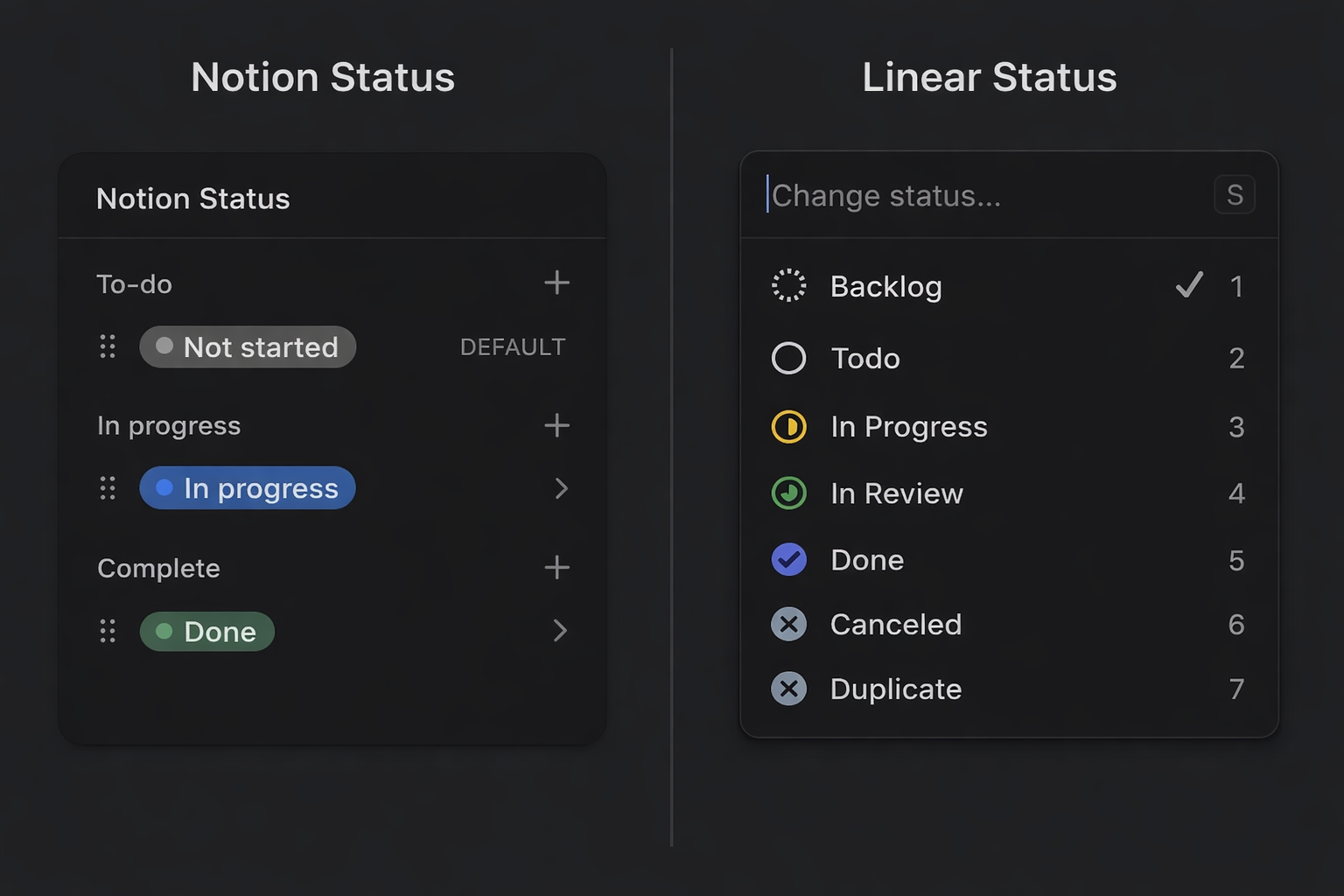
Even something as small as task status is not a simple field copy.
In Notion, a task might have a human-readable status like To Do or In Progress. In Linear, an issue belongs to a workflow state with both a label and a state type such as backlog, unstarted, started, or completed.
A reliable sync cannot compare labels alone. It has to compare meaning.
That shifts the real problem from “moving data between APIs” to “building a system that can preserve identity, structure, and semantics across two different tools.”
The Design Decision That Made the Project Work
The design decision that made the whole service workable was introducing a shared internal model layer.
Instead of comparing raw Notion responses against raw Linear GraphQL nodes, the service translates both into unified Python models first. Projects become UnifiedProject, milestones become UnifiedMilestone, and tasks become UnifiedTask.
That gives the sync engine a stable internal language.
Once everything is normalized into a shared representation, the rest of the architecture becomes much cleaner:
- The reconciler compares like with like
- Conflict logic operates on consistent fields
- Platform-specific translation stays at the edges
- The codebase no longer scatters Notion-vs-Linear conditionals everywhere
The flow looks like this:
Notion API data + Linear API data
                ↓
        Unified internal models
                ↓
         Reconcile differences
                ↓
      Write changes to target side
                ↓
      Resolve relationships + save state
The unified model is not just a convenience layer. It is what makes reconciliation possible.
System Structure
Once the internal model layer was in place, the rest of the service settled into a fairly clean architecture.
Configuration
Handles environment variables, API credentials, database IDs, field mappings, and conflict strategy settings.
API clients
Wrap Notion and Linear directly. They handle authentication, requests, pagination, rate limiting, and platform-specific response structure.
Unified models
Represent the internal source of truth used by the sync engine.
Mappers
Convert records into and out of the unified models. They also translate semantics, such as mapping Notion priority labels to Linear priority values or converting Linear workflow states into a Notion-friendly status representation.
Reconciler
Compares normalized records and decides whether each one should be created, updated, deleted, or treated as a conflict.
Relation resolver
Repairs relationships after base records already exist in both systems.
State store
Keeps durable sync memory: linked IDs, timestamps, content hashes, and prior sync metadata.
Utilities
Cover retries, rate limiting, logging, and CLI support.
A simplified view of the architecture looks like this:
CLI
→ Config
→ API Clients
→ Unified Models
→ Mappers
→ Reconciler
→ Relation Resolver
→ State Store
→ Notion / Linear APIs
Following One Task Through the Pipeline
The easiest way to explain the sync flow is to follow a single task through it.
Imagine someone creates a task in Notion called Write API docs. They set:
- status = In Progress
- priority = High
- sync enabled = true
- linked project and milestone
The service fetches that page from Notion and parses it into a unified task model. At that point, it is no longer reasoning about raw Notion properties. It is working with an internal task record that contains fields like title, status, priority, relation IDs, and last modified time.
From there, the mapper translates platform-specific meaning.
For example:
- Notion High priority becomes the Linear priority value expected by the target API
- Notion In Progress becomes a normalized internal state
- That state is then matched to the appropriate Linear workflow meaning rather than copied literally
The reconciler compares that unified task against the matching Linear issue, along with persisted sync state from earlier runs.
If no matching Linear issue exists, the engine creates one.
If one exists but differs, it updates it.
If both sides changed incompatibly since the last successful sync, it becomes a conflict.
Once the write succeeds, the service stores the Notion ID ↔ Linear ID mapping locally so future runs know both records represent the same task.
If some relationships could not be applied immediately, the relation resolver reconnects them later once all required cross-system IDs exist.
That miniature pipeline captures the whole system:
normalize → compare → decide → write → reconnect → remember
What Counts as a Real Change
One of the subtler design problems was deciding what should count as a meaningful change.
A sync engine cannot just ask whether two payloads look different. It has to ask whether they are semantically different in a way that should trigger an update.
To do that, the service combines several signals:
- linked identity
- modification timestamps
- normalized content
- persisted sync state
For each synced entity, the local store keeps:
- Notion ID
- Linear ID
- last modified times from both sides
- normalized content hash
- last sync metadata
Each signal matters, but none is enough on its own.
- IDs tell the system what matches, but not what changed
- Timestamps can be noisy
- Raw payloads can differ in representation without differing in meaning
- State is what makes those signals useful together
This is where the service stopped behaving like a script and started behaving like an engine.
The Two Things That Made It Reliable
Two parts of the design mattered more than almost anything else:
- relationship handling
- persistent sync state
1. Relationship handling
Relationships are easy to underestimate.
A task can belong to a milestone.
A milestone can belong to a project.
A task can also have a parent task.
If every record is synced independently in one pass, many of those references fail simply because the destination record does not exist yet.
The solution was a two-pass strategy.
First pass: create or update base records
Second pass: repair project, milestone, task, and subtask relationships once cross-system IDs are known
That second pass is handled by a dedicated relation resolver that uses lookup maps in both directions.
2. Persistent sync state
Without local state, the service has no durable memory.
It can fetch data and compare timestamps, but it cannot truly know:
- what it created before
- what changed semantically
- whether a record is genuinely new
- whether two records are already linked
So the service keeps a local SQLite store with:
- linked IDs
- timestamps
- content hashes
- prior sync metadata
That gives the engine continuity across runs. It can avoid duplicates, detect changes more accurately, and treat sync as an ongoing process instead of starting from zero each time.
One Failure Mode That Changed the Design
One of the most useful failure cases was also one of the simplest: duplicate creation after partial success.
Imagine the service successfully creates a record in the target system, but fails before persisting the new linkage locally.
On the next run, that same source record can still look unsynced. The engine may then create a second copy.
That is the kind of bug that does not show up in a clean demo but appears quickly in a real system.
It reinforced an important design lesson: local sync state is not just metadata for convenience. It is part of the identity model of the system.
The same pattern showed up with relationships. Creating a task before its milestone mapping existed was not really an API bug. It was a sequencing problem.
That realization pushed the design toward explicit relation repair instead of trying to force everything into a single perfect pass.
Making It Safe to Run
Once the happy path worked, the next question was whether the system behaved well under ordinary failure conditions.
That meant adding:
- retry logic with exponential backoff
- explicit rate limit handling
- dry runs through the CLI
- structured logging around every sync action
- configurable conflict resolution
The retry layer wraps API calls with backoff and jitter, while rate limiters help avoid throttling before it happens.
The CLI also matters more than it might seem. The sync can run:
- bidirectionally
- Notion → Linear only
- Linear → Notion only
It can also be scoped to:
- projects only
- milestones only
- tasks only
And dry-run mode lets you inspect intended actions before allowing writes.
Conflict handling had to be configurable too. In a bidirectional sync, there is no universal answer to which side should win when both records changed.
Depending on the workflow, the right strategy might be:
- last-write-wins
- Notion-primary
- Linear-primary
Those operational features are less visible than the core data flow, but they are what make the tool usable outside of controlled demos.
What I Learned
The biggest lesson from the project is that synchronization problems stop being API problems almost immediately.
At first, I assumed most of the work would be authentication, field mapping, and request handling. Those pieces mattered, but they were not the center of the challenge.
The hard part was:
- defining a stable internal model
- preserving relationships across systems
- deciding what changed in a meaningful way
- keeping enough memory of earlier runs to avoid guessing
In other words, the core problem was not moving data. It was establishing internal truth.
Once that became clear, the APIs stopped being the main event. They became edges. The architecture in the middle became the actual product.
Tradeoffs
That architecture comes with tradeoffs.
A unified internal model makes reconciliation much easier, but it also means the mapping layer has to evolve as either API changes.
Persistent local state makes the system safer and more reliable, but it adds operational surface area. Once identity, timestamps, and hashes are stored locally, that state becomes part of the product.
And bidirectional sync is far more useful than a one-way export, but it guarantees that conflict resolution is not an edge case. It is part of normal operation.
Those tradeoffs were worth it. But reliability here comes from accepting complexity and placing it deliberately at the center of the system rather than pretending it is not there.
If this kind of system design and reliability-focused architecture is interesting to you, you can explore more of my work at zachary-sturman.com, or dive into the full implementation on GitHub: **https://github.com/ZSturman/Linear-Notion-Sync.**
Keep reading
More from the portfolio
Projects connected to this article

Notion as a Source of Truth
Portfolio Sync System is a project operations workflow for managing metadata, documentation, and portfolio publishing from a single structured source of truth. It began as a folder-based project system using local files and .project.json, then evolved through a custom metadata editor into a relational Notion workspace connected to work logs, tasks, milestones, and media. The system uses formulas, required-action logic, severity scoring, and visual workflow cues inside Notion to make project readiness measurable and easier to maintain. n8n watches for qualifying project changes, compiles portfolio-ready JSON, and passes that data into a Python-based build pipeline that prepares content and media for a static portfolio site. Linear handles issue tracking, GitHub stores code and optimized assets, and Firebase Hosting serves the finished portfolio. The result is a project operating system that reduces duplicate entry, improves documentation quality, and keeps the portfolio aligned with the real state of the work over time.

Episodic Memory Agent
An event-segmented episodic memory agent designed to simulate how an intelligent system perceives, interprets, and organizes experience over time. The architecture centers on a strict cognitive loop—resolving location, identifying entities, detecting change—and freezing those moments into structured episodes. Built with swappable modules, strict invariants, and full logging, the system prioritizes learning over hardcoded assumptions, user-defined semantics over predefined categories, and reproducible behavior over opaque heuristics.
ZSDynamics 1.1
After digging deeper into data science, I wanted the portfolio to be more than a place to drop my work. So I added a simple email subscription so visitors could get updates, and I integrated Dashly for some lightweight analytics and visualization. It was a noticeable step forward for me—not just in the code, but in how I was thinking about the people visiting the site.